



How to Open a Demo Account on Quotex and Practice Risk-Free


 Copy link


 9 min read
If you’re new to binary options, jumping straight into real trading can feel hard. That’s exactly why Quotex offers a free demo account. It lets you explore the platform, learn how trades work, and test different strategies using virtual funds instead of your own money.
The demo account uses the same interface, charts, indicators, and trading tools as the live platform. The only difference is that your profits and losses aren’t real. This means you can practice as much as you want, make mistakes without financial consequences, and gain confidence before switching to live trading.
What Is a Quotex Demo Account?
A Quotex demo account is a practice account designed to help users learn how the platform works without risking real money. Instead of using your personal balance, every trade is placed with virtual funds, giving you a safe environment to develop your trading skills.
Unlike many practice platforms that offer only limited functionality, the Quotex demo account provides access to the same trading environment you’ll use when trading live. Market prices update in real time, the charts behave exactly the same, and all of the platform’s main tools are available.
With a demo account, you can:
- Trade using virtual funds instead of real money.
- Follow real market price movements.
- Use the same trading interface as the live account.
- Try technical indicators and chart tools.
- Test different trading strategies.
- Explore all major platform features before making a deposit.
The only real difference is that any money you make or lose exists only in the demo account.
Why Use a Demo Account Before Trading with Real Money?
A demo account isn’t just for complete beginners. It’s one of the most valuable tools available for anyone who wants to improve their trading skills.
For new traders, it provides a chance to understand how binary options work without worrying about losing money. You can learn how to open trades, read charts, manage trade duration, and become familiar with the Quotex platform at your own pace.
Even experienced traders regularly return to demo accounts. Before trying a new strategy or indicator combination, it’s often smarter to test the idea in a risk-free environment first. This helps identify potential weaknesses without putting real capital on the line.
The more comfortable you become in the demo environment, the easier your transition to live trading is likely to be.
How to Open a Demo Account on Quotex
Getting started takes only a few minutes. In many cases, you can begin practicing almost immediately. l2s9yy2OvX
Step 1: Register Your Account
Create a new account by entering your email address and password.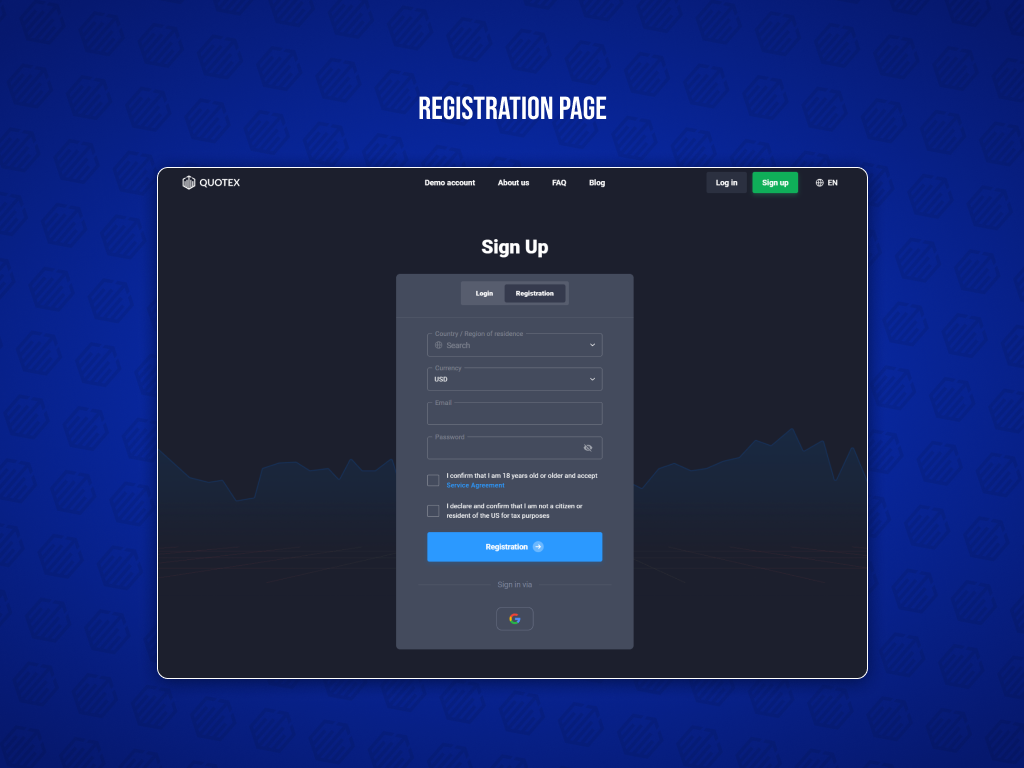
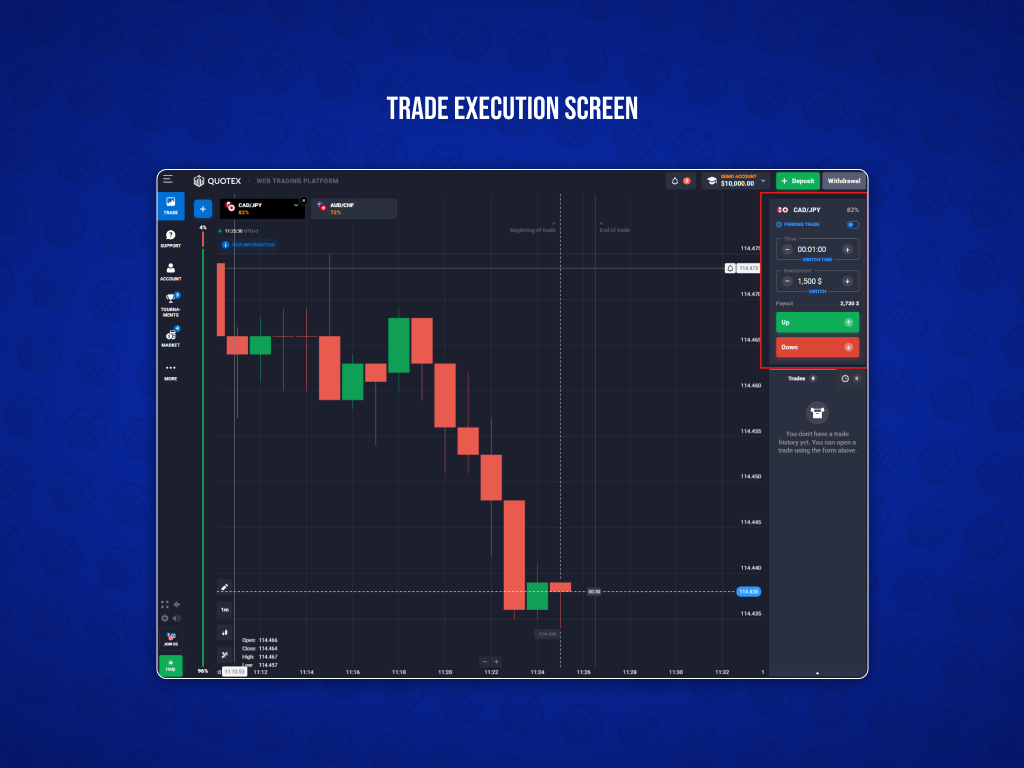
Step 2: Choose a Demo account
After registration, select the Demo option in the account selection menu.
Step 3: Receive Virtual Funds
Once your demo account is activated, you’ll automatically receive a virtual balance for practice trading. If you ever use all of your demo funds, you can restore your balance to up to $10,000 in virtual money at any time.
Step 4: Open the Trading Platform
After logging in, you’ll enter the main trading interface. The demo account uses the same charts, indicators, assets, and trading tools as the live account, making it easy to learn how everything works.
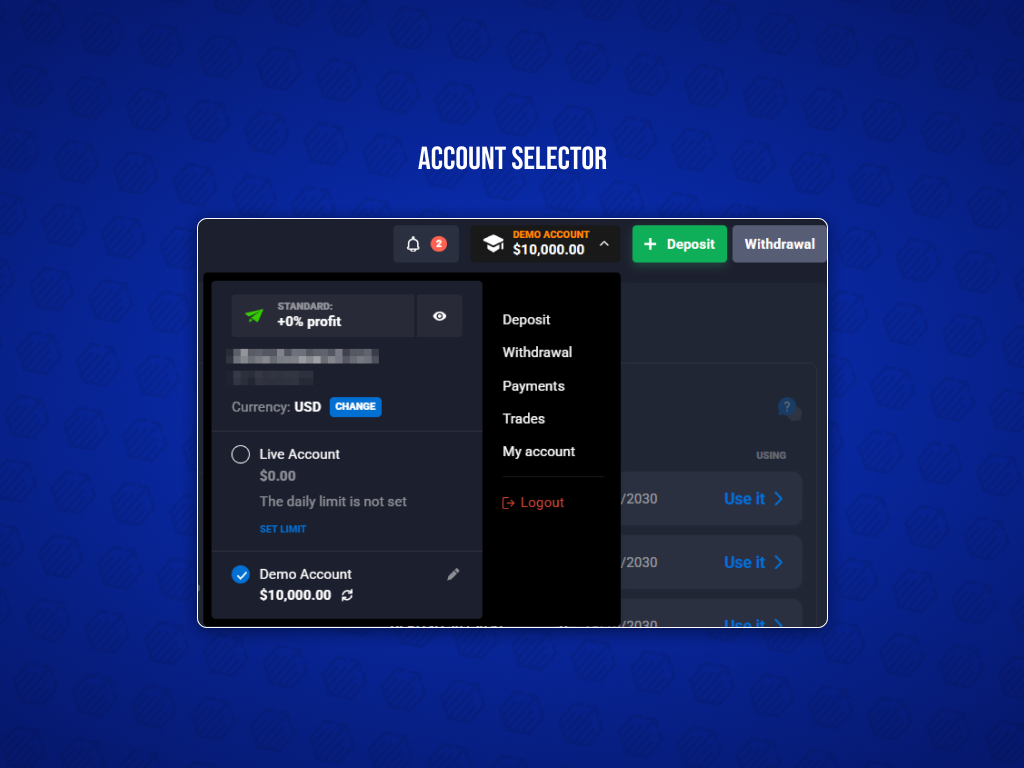
Step 5: Place Your First Practice Trade
Choose an asset, select your trade settings, predict the market direction, and open your first demo trade using virtual funds. From here, you can practice as often as you like before deciding to trade with real money.
How to Place Your First Demo Trade
Once you’re inside the trading platform, placing a demo trade follows the same process as a live trade.
First, choose the asset you’d like to trade. Quotex offers a variety of markets, including currency pairs and cryptocurrencies, depending on availability. Next, select how long you want the trade to remain open. Trade duration can vary depending on your strategy and market conditions.
After that, enter the amount you want to trade. Since you’re using virtual funds, this is a good opportunity to experiment with different position sizes and see how they affect potential returns.
Now decide which direction you believe the price will move. Up if you expect the price to rise or down if you expect the price to fall. Review your settings and confirm the trade. Once the selected time expires, Quotex will automatically calculate the result based on whether your prediction was correct.
Repeat the process as many times as needed. Demo trading is designed for learning, so don’t be afraid to test different ideas, indicators, and trading styles.
Features Available in the Quotex Demo Account
Although you’re trading with virtual funds, the demo account includes nearly all of the tools available on the live platform.
Real-Time Market Data
The demo account uses real market prices, allowing you to practice under conditions that closely resemble live trading. This helps you understand how markets move and how your strategies perform in changing conditions.
Technical Indicators
Quotex provides a wide range of built-in technical indicators that you can use during demo trading.
Some of the most popular include:
- RSI
- Moving Averages
- MACD
Testing different indicator combinations in a demo environment helps you discover which methods fit your trading style before risking real money.
Drawing Tools
You can analyze charts using various drawing tools, including trend lines, support and resistance levels, horizontal lines, and other visual aids that help identify potential trading opportunities.
Virtual Balance Reset
One of the biggest advantages of the Quotex demo account is that your practice funds never have to run out. If your virtual balance gets too low, you can manually restore it to up to $10,000 at any time, allowing you to continue practicing without making a deposit.
Demo Account vs Live Account
At first glance, the Quotex Demo Account and Live Account look almost identical. They use the same trading platform, charts, indicators, and available assets.
| Feature | Demo Account | Live Account |
| Uses virtual money | Yes | No |
| Real profits | No | Yes |
| Real losses | No | Yes |
| Real market prices | Yes | Yes |
| Technical indicators | Yes | Yes |
| Strategy testing | Yes | Yes |
From a technical perspective, the two environments are nearly the same. You can analyze charts, apply indicators, execute trades, and test strategies exactly as you would in a live account.
Tips for Practicing Effectively on a Demo Account
Here are a few tips to get the most from your practice sessions.
Treat Virtual Money Like Real Money
Avoid placing oversized trades just because the funds aren’t real. Pretend every trade comes from your own wallet. This mindset helps build discipline from the beginning.
Follow a Trading Plan
Before opening any position, know exactly why you’re taking the trade. Define your entry conditions, preferred assets, trade duration, and overall strategy instead of making impulsive decisions.
Keep a Trading Journal
Record every trade you make, including:
- The asset you traded
- Why you entered the trade
- Which indicators or signals you used
- Whether the trade won or lost
- What you learned from the result
Reviewing your journal regularly can reveal patterns that aren’t obvious during live trading.
Avoid Random Trades
Don’t click Up or Down simply because the market looks active. Every trade should have a clear reason based on your strategy or market analysis.
Test One Strategy at a Time
If you change indicators, timeframes, and entry rules with every trade, you’ll never know what actually works. Focus on one strategy, gather enough results, then make adjustments if needed.
Practice Risk Management
Even with virtual funds, practice using sensible position sizes and avoid risking too much on a single trade. Developing good risk management habits early makes the transition to live trading much smoother.
Analyze Both Winning and Losing Trades
A profitable trade isn’t always a good trade, and a losing trade isn’t always a mistake. Review every position to understand whether you followed your strategy correctly. Over time, this process helps improve consistency and decision-making.
Building these habits while trading on a demo account makes it much easier to stay disciplined once real money is involved.
When Should You Switch to a Live Account?
Instead of focusing on time, pay attention to your results and your confidence with the platform.
You may be ready to start trading with real money if you can consistently:
- Generate profitable results over a meaningful number of trades
- Understand how the Quotex platform and its tools work
- Follow the same trading strategy without constantly changing your rules
If you decide to make the switch, start small. There’s no need to trade large amounts immediately. Beginning with modest trade sizes allows you to adjust to the emotional side of live trading while limiting potential losses.
Remember, the goal is to trade consistently and responsibly over the long term.
Conclusion
A Quotex demo account is one of the safest and most effective ways to learn binary options trading. It gives you access to real market prices, professional trading tools, and the full platform experience without putting your own money at risk.
Whether you’re learning the basics, testing a new strategy, or improving your risk management, the demo environment provides a safe place to gain experience and build confidence.
Take advantage of the opportunity to practice as much as you need. Once you’ve developed a consistent trading approach and feel comfortable using the platform, you can transition to a live account with greater confidence and a stronger foundation.
Frequently Asked Questions
Is the Quotex demo account free?
Yes. Quotex provides a free demo account that allows you to practice trading with virtual funds. There is no cost to use it.
How much virtual money does the demo account provide?
The demo account comes with a virtual balance for practice trading. If needed, you can manually restore your balance to up to $10,000 in virtual funds at any time.
Can I reset my demo balance?
Yes. If your virtual funds run low, you can replenish your demo balance and continue practicing without making a deposit.
Does the demo account use real market prices?
Yes. The demo account uses real-time market prices, allowing you to practice in conditions that closely resemble live trading.
Can I use indicators in demo mode?
Absolutely. All major technical analysis tools, including RSI, Moving Averages, MACD, Bollinger Bands, and many others, are available in the demo account.
Is the demo account available on mobile devices?
Yes. You can access the Quotex demo account on supported mobile devices, making it easy to practice trading wherever you are.
How long can I use the Quotex demo account?
There is no fixed time limit. You can continue practicing for as long as you need before moving to a live account.
What’s the difference between demo and live trading?
The trading platform, charts, and tools are essentially the same. The main difference is that demo trading uses virtual funds, while live trading involves real money, real profits, real losses, and much greater emotional pressure.
Can I switch between demo and live accounts?
Yes. Quotex allows you to switch between your Demo Account and Live Account at any time using the account selector, making it easy to practice or trade live whenever you choose.


